
Quick Answer
The company you use is not always the company billing you.
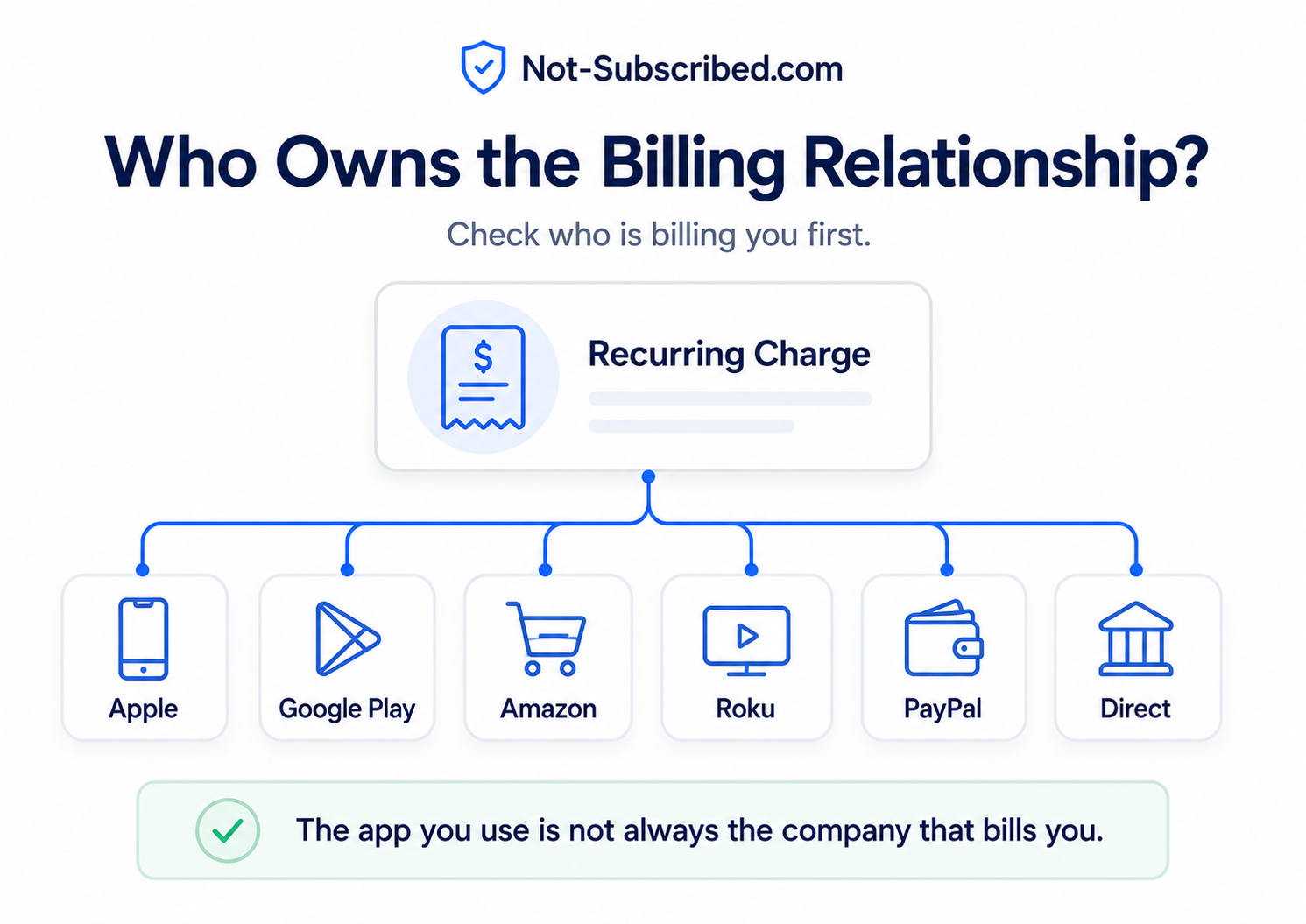
In subscription land, the billing relationship belongs to whoever processes your payment, manages your renewal, and controls the cancellation switch. That might be:
The service itself
Apple
Google Play
Amazon
Roku
PayPal
Your cable or phone provider
Another third-party billing platform
This matters because canceling in the wrong place usually does not stop the charge.
You can delete the app, close your account, email the company, or swear dramatically at your phone. But if Apple, Google, Roku, Amazon, or PayPal owns the billing relationship, you usually need to cancel through that provider instead.
Not-Subscribed’s playbook specifically calls out this kind of confusion as a core reader problem: people often do not know whether a subscription is billed through Apple, Google, Amazon, Roku, PayPal, or the company directly.
What “Billing Relationship” Means
The billing relationship is the link between you and the party authorized to charge your payment method.
Think of it as the subscription control room.
Whoever owns the billing relationship usually controls:
Your renewal date
Your payment method
Your invoices or receipts
Your cancellation button
Your refund path
Your subscription status
Whether auto-renewal is on or off
The service you are using may provide the content, app, membership, or software. But the billing provider may be someone else entirely.
That is why a streaming app might say:
“You subscribed through Apple. Manage your subscription in Apple Settings.”
Annoying? Yes. Random? Not really.
It means the app may recognize your paid access, but Apple owns the billing relationship.
The Service Provider vs. The Billing Provider
There are usually two roles in a subscription:
The service provider
This is the company whose product you use.
Examples:
A streaming service
A fitness app
A dating app
A cloud software tool
A news site
A game subscription
The service provider controls the actual product experience.
The billing provider
This is the company or platform that charges you.
Examples:
Apple App Store
Google Play
Amazon
Roku
PayPal
The service’s own website
A phone carrier
A cable provider
The billing provider controls the payment relationship.
Sometimes these are the same company. Sometimes they are not.
That difference is where many cancellation headaches begin.
Why This Matters When You Try to Cancel
When you want to stop paying, you need to cancel with the party that has permission to charge you.
That sounds simple until you remember that many subscriptions can be started in several different places.
You might sign up for the same service through:
The company’s website
An iPhone app
An Android app
A Roku device
An Amazon Prime Video Channel
A PayPal checkout page
A smart TV app
A phone or internet bundle
Each path can create a different billing relationship.
So when you ask, “How do I cancel this?” the real first question is:
Who is billing me?
Not “Which app do I use?”
Not “Which company name do I recognize?”
Not “Where did I last log in?”
The billing source is the key.
Common Examples
Example 1: You use the app, but Apple bills you
You downloaded a subscription app on your iPhone and subscribed inside the app.
The app may show your paid account, but Apple may control cancellation.
In that case, you would usually check:
iPhone Settings → Your Name → Subscriptions
Canceling inside the app may not be available because Apple owns the billing relationship.
Example 2: You watch the service, but Roku bills you
You signed up for a streaming subscription through your Roku device.
The streaming service may provide the shows, but Roku may process the payments.
In that case, you may need to cancel through your Roku account or device subscription settings.
Example 3: You recognize the service, but PayPal is the payment path
You used PayPal when signing up.
The company may manage your account, but PayPal may have an active recurring payment agreement.
In that case, you may need to cancel with the service and also check your PayPal automatic payments.
Example 4: You subscribed directly
You signed up on the company’s website using a credit card.
In this case, the company likely owns the billing relationship.
You would usually cancel through the service’s account, membership, billing, or subscription settings.
How to Find Out Who Owns the Billing Relationship
Start with the charge itself.
1. Check your card or bank statement
Look at the exact billing descriptor.
You might see something like:
GOOGLE PLAY
ROKU
AMAZON
PAYPAL
The service name directly
The name on the statement is often your best clue.
2. Search your email for receipts
Search your inbox for:
“receipt”
“subscription”
“renewal”
“invoice”
“trial”
The service name
Apple, Google, Roku, Amazon, or PayPal
Receipts usually reveal who processed the payment.
3. Check app store subscriptions
On iPhone, check Apple subscriptions.
On Android, check Google Play subscriptions.
This is especially important if you subscribed inside a mobile app.
4. Check third-party accounts
Look at:
Amazon memberships and subscriptions
Roku subscriptions
PayPal automatic payments
Your phone or cable provider account
Some subscriptions hide in places that do not look like the app itself.
5. Log in to the service directly
Open the service’s website and check account or billing settings.
If the service says something like “managed by Apple,” “billed through Google Play,” or “purchased through Roku,” that tells you where to cancel.
A Simple Rule
Cancel where the payment started.
If you subscribed through Apple, cancel through Apple.
If you subscribed through Google Play, cancel through Google Play.
If you subscribed through Roku, cancel through Roku.
If you subscribed through Amazon, cancel through Amazon.
If you subscribed directly on the company’s website, cancel on the company’s website.
That rule will not solve every subscription mess, but it solves a lot of them.
Why Deleting the App Usually Does Not Work
Deleting an app removes the app from your device.
It does not automatically cancel the billing agreement.
That is because the subscription lives in an account or billing system, not inside the app icon on your phone.
So if you delete a fitness app but the subscription was created through Apple, Apple may keep renewing it until you cancel through your Apple subscription settings.
This is one of the most common subscription traps. It is not always obvious, and it is not your fault for assuming deletion might stop payment. Apps feel physical on a phone. Billing is not.
Why Companies Sometimes Cannot Cancel It for You
This part feels especially weird.
You contact the service and say, “Please cancel my subscription.”
They say, “We can’t cancel it. You need to contact Apple.”
That can sound like a brush-off. Sometimes it may feel like cancellation friction. But in many cases, the company genuinely does not control the billing relationship.
If Apple, Google, Roku, Amazon, or PayPal processed the subscription, the service may not be allowed to directly cancel or refund it from its own system.
The company may be able to explain where to go, but the billing provider controls the actual switch.
Common Roadblocks
“I logged into the service, but there is no cancel button.”
That often means the service does not own the billing relationship.
Look for wording like:
“Subscribed through Apple”
“Managed by Google Play”
“Billed by Roku”
“Purchased through Amazon”
“Manage with your provider”
“The app says I do not have an active subscription, but I am still charged.”
You may be logged into the wrong account, or the charge may be coming from a different billing provider.
Check your receipt emails and statement descriptor.
“I canceled on the website, but Apple still charged me.”
You may have had an Apple-managed subscription, not a direct website subscription.
Check Apple subscriptions and confirm the status shows canceled or expiring.
“I canceled PayPal, but the service still says active.”
Canceling a PayPal automatic payment may stop future PayPal charges, but it may not close the subscription account inside the service.
Check both places and save proof.
“I subscribed through a bundle.”
Your billing relationship may be with a phone company, cable provider, internet provider, or membership bundle.
Canceling directly with the app may not work if your access is attached to a third-party package.
How to Confirm You Canceled in the Right Place
Do not stop at the first “Are you sure?” screen.
A real cancellation usually gives you at least one confirmation signal.
Look for:
A confirmation email
A subscription status that says canceled
An expiration date instead of a renewal date
Auto-renewal turned off
A final access date
A cancellation confirmation number
A screenshot-worthy confirmation page
Take a screenshot. Save the email. Future you may need the receipt trail.
What to Do If You Are Still Charged
If a charge appears after you thought you canceled:
Check the billing descriptor on your statement.
Search your email for the most recent receipt.
Confirm whether the charge came from the service directly or a billing provider.
Recheck Apple, Google Play, Amazon, Roku, and PayPal if relevant.
Contact the billing provider that processed the charge.
Contact the service with screenshots and cancellation proof.
Request a refund when appropriate.
Consider a card dispute only after reasonable direct attempts, unless the charge is clearly unauthorized.
The important thing is to follow the money trail, not just the app trail.
The Bigger Pattern: App-Store Billing Confusion
Billing relationship confusion is one of the quieter forms of subscription sludge.
The subscription may be easy to start from almost anywhere: an app, a website, a TV screen, a checkout button, or a free trial offer.
But when you want to cancel, the system suddenly cares very much about where the subscription began.
That gap creates cancellation friction.
Not always because anyone is plotting against you in a smoky room. Sometimes it is just the messy result of multiple platforms, payment systems, app stores, bundles, and retention incentives all overlapping.
Still, the consumer experience is the same:
You want to stop paying.
The system makes you figure out who has the cancel button.
That is why “who owns the billing relationship?” is one of the first questions to ask before canceling almost anything.
The Not-Subscribed Note
A subscription is not just a product. It is a billing relationship.
Before you cancel, pause, downgrade, or dispute a charge, find out who is actually billing you. The fastest cancellation path is usually not the app you use most. It is the platform or company that controls the renewal.
Cancel smarter. Subscribe slower.