
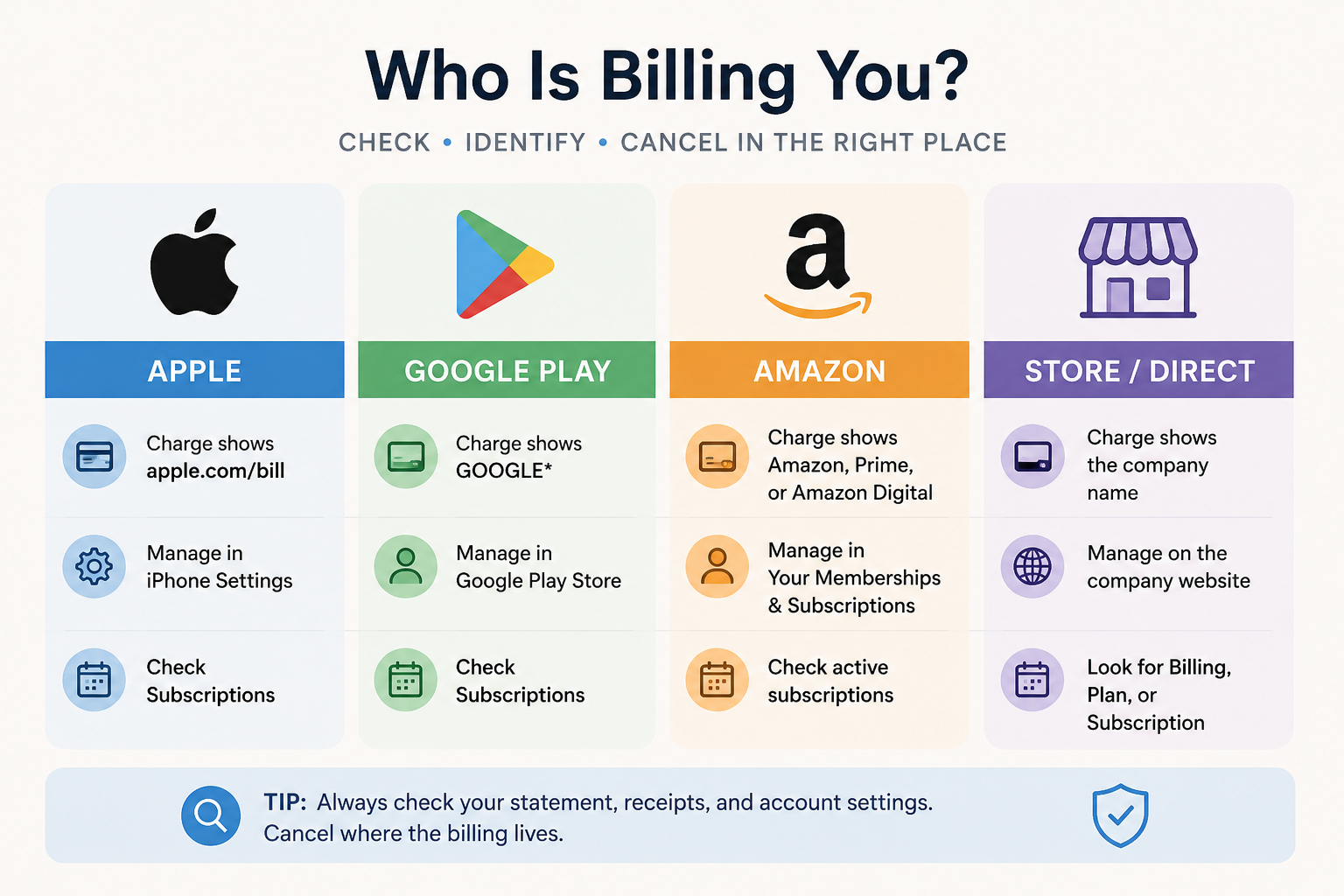
This infographic helps readers quickly identify who is billing their subscription by comparing Apple, Google Play, Amazon, and direct company billing. It highlights the most common charge descriptions and reminds readers to cancel through the billing provider rather than simply deleting the app.
Updated: July 1, 2026
If you're trying to cancel a subscription but can't figure out who is charging you, you're not alone. One of the most common subscription headaches is discovering that the company you're paying isn't actually the company you need to cancel with.
The key is to identify who processes the recurring payment. If Apple, Google Play, or Amazon handles the billing, you'll usually need to cancel through that platform—not through the app or service itself.
Quick Answer
Start by looking at your credit card or bank statement.
apple.com/bill usually means Apple is billing you.
GOOGLE* usually means Google Play is billing you.
Amazon, Amazon Digital, Prime Video, or Amazon Appstore usually means Amazon is billing you.
If the charge shows the company's own name, you're probably being billed directly by that business.
Deleting an app almost never cancels the subscription. Always identify the billing provider before trying to unsubscribe.
Why It Matters
Many apps don't process payments themselves.
For example:
You might subscribe to a streaming service through Apple's App Store.
You might purchase an app through Google Play.
You might add a Prime Video Channel through Amazon.
Or you might subscribe directly on the company's own website.
Even though you're using the exact same service, the cancellation path depends entirely on who processes the payment.
How to Tell If Apple Is Billing You
Apple subscriptions are managed through your Apple ID rather than through individual apps.
Signs Apple Is the Billing Provider
Apple is probably billing you if:
Your card statement says apple.com/bill
Your receipt came from Apple
The subscription appears in your iPhone subscription list
The app tells you to manage the subscription through the App Store
According to Apple Support, charges labeled apple.com/bill may include subscriptions, apps, movies, music, iCloud+, Apple One, and other Apple services.
How to Check
Open Settings.
Tap your name.
Tap Subscriptions.
Review your active subscriptions.
Select one to view renewal dates or cancel.
Apple explains the cancellation process in its official subscription guide.
How to Tell If Google Play Is Billing You
Android subscriptions purchased through Google Play are managed inside your Google account.
Signs Google Play Is Billing You
Google is probably billing you if:
Your statement begins with GOOGLE*
Your receipt came from Google Play
The subscription appears inside Google Play
The app tells you to manage billing through Google Play
Google notes that purchases often appear on statements as GOOGLE* followed by the developer or app name in its Google Play Help documentation.
How to Check
Open the Google Play Store.
Tap your profile picture.
Tap Payments & subscriptions.
Tap Subscriptions.
Review active subscriptions.
Google's official cancellation instructions are available through Google Play Help.
How to Tell If Amazon Is Billing You
Amazon manages several different subscription systems, including Prime memberships, Prime Video Channels, Kindle Unlimited, Audible, and subscriptions purchased through the Amazon Appstore.
Signs Amazon Is Billing You
Amazon is probably the billing provider if:
Your statement includes Amazon
The charge says Amazon Digital
You see Prime Video
You subscribed using a Fire TV or Fire tablet
Your receipt came from Amazon
How to Check
Sign into Amazon.
Visit Your Memberships & Subscriptions.
Review active memberships.
Also review Prime Video Channels if applicable.
Check Amazon Appstore subscriptions if you purchased an Android app through Amazon.
Amazon provides instructions through its Manage Your Memberships and Subscriptions page and its Appstore subscription help page.
How to Tell If the Company Bills You Directly
Not every subscription goes through an app store.
Many companies—including streaming services, software providers, fitness memberships, and online services—bill customers directly from their own websites.
Signs the Company Is Billing You
The company is probably billing you directly if:
Your statement shows the company's own name.
Your receipt came from the business instead of Apple or Google.
The subscription doesn't appear in Apple, Google Play, or Amazon.
You originally signed up in a web browser.
How to Check
Visit the company's website.
Sign in.
Open Account, Membership, Billing, Plan, or Subscription.
Review your active plan.
Look for cancellation or auto-renewal settings.
Search Your Email Receipts
If you're still unsure who's billing you, search every email account you use.
Try searching for:
receipt
invoice
renewal
subscription
Apple
Google Play
Amazon
the company's name
The original purchase receipt almost always identifies the billing provider.
Check Your Bank or Credit Card Statement
Your statement often provides the biggest clue.
Statement Description Most Likely Billing Provider apple.com/bill Apple GOOGLE* Google Play Amazon Digital Amazon Prime Video Amazon Company Name Direct billing
The exact wording can vary slightly depending on your bank.
Common Billing Confusion
You Deleted the App
Removing an app from your phone does not cancel the subscription.
Recurring billing continues until you cancel through the correct billing provider.
You Canceled the Account
Some companies let you close your account without canceling your subscription.
Always verify that:
auto-renew is turned off
the subscription says Canceled or Expires
you received a confirmation email
Someone Else Started the Subscription
Family Sharing, shared tablets, shared Amazon accounts, and family payment methods can all create confusion.
Ask other household members before assuming the charge is unauthorized.
You Used a Different Email Address
Many people accidentally create subscriptions under an old email address.
If the app doesn't show an active subscription, try signing in with:
another personal email
a work email
your Apple ID
your Google account
What to Do If You Still Can't Find the Charge
If nothing matches:
Search all email accounts for receipts.
Check Apple subscriptions.
Check Google Play subscriptions.
Check Amazon memberships.
Log into the company's website.
Contact customer support.
Contact your card issuer if the charge appears unauthorized.
How to Confirm You've Found the Right Billing Provider
Before canceling, make sure at least one of these is true:
The subscription appears in the provider's subscription list.
The receipt came from that provider.
The charge description matches.
The renewal date matches your card statement.
Once everything lines up, you can confidently cancel through the correct platform.
The Not-Subscribed Note
This is one of the biggest sources of app-store billing confusion.
People naturally try to cancel through the app they're using, but many subscriptions are actually managed by Apple, Google Play, Amazon, or another marketplace. That's why a "Cancel" button sometimes seems impossible to find—it isn't hidden; it's simply located somewhere else.
Finding the billing provider first usually turns a frustrating cancellation into a quick one.
Disclaimer
Subscription settings, billing systems, and cancellation paths can change over time. This guide is for general informational purposes and is not legal or financial advice. Always verify cancellation directly with the billing provider or service before assuming recurring charges have stopped.