
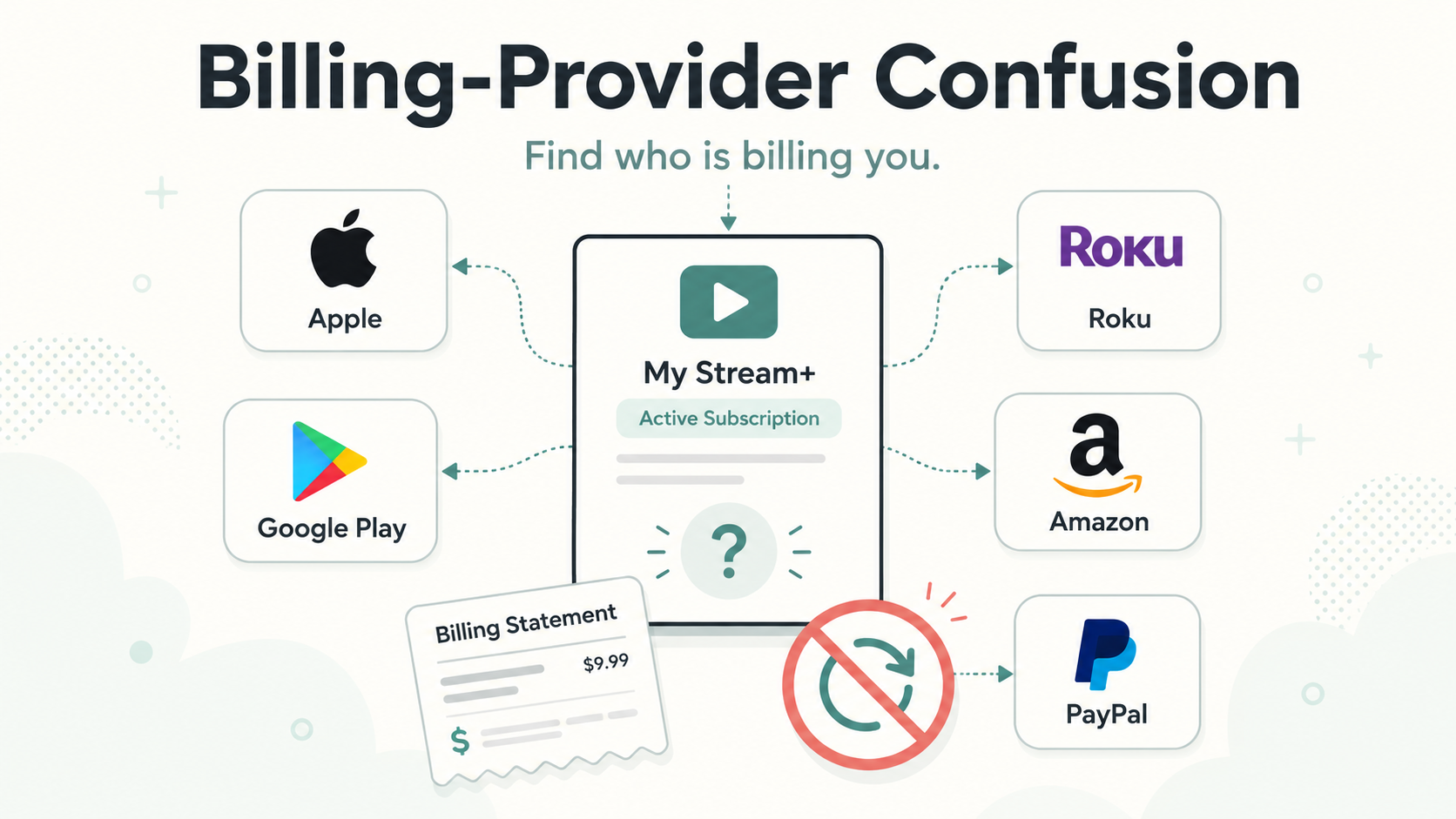
Quick answer
Billing-provider confusion happens when the company you use, the app you opened, and the company charging your card are not the same.
You might watch a streaming service on Roku, subscribe from an iPhone, log in with Google, pay through PayPal, or start a trial on a company’s website. Later, when you try to cancel, the service may tell you:
“You need to manage this subscription through your billing provider.”
That usually means the service itself cannot cancel the charge because Apple, Google Play, Roku, Amazon, PayPal, your cable provider, or another third party is handling the billing.
Annoying? Yes. Unusual? Not at all.
What is a billing provider?
A billing provider is the company or platform that processes your subscription payment.
Sometimes the billing provider is the service itself. For example, you subscribe to a streaming service directly on its website and the charge comes from that company.
Other times, the billing provider is a third party, such as:
Apple App Store
Google Play
Roku
Amazon
PayPal
Your cable or internet provider
A mobile carrier
A payment processor
A bundle partner
This matters because you usually have to cancel through the same place that bills you.
So if Apple is billing you, cancel through Apple.
If Roku is billing you, cancel through Roku.
If PayPal is managing the recurring payment, cancel through PayPal.
If the service is billing you directly, cancel through that service.
Simple idea. Messy reality.
Why billing-provider confusion happens
Billing-provider confusion usually happens because subscriptions can be started in many different places.
You may have signed up:
Inside an iPhone app
Inside an Android app
On a Roku device
Through Amazon Prime Video Channels
Through a streaming service’s website
Through a smart TV app
Through PayPal
Through a promotion or bundle
Through a phone, cable, or internet provider
The service may look the same no matter where you watch it, but the billing path underneath can be totally different.
That is why deleting an app, logging out, or removing a channel often does not stop billing. The subscription is attached to the billing provider, not just the app icon.
A simple example
Let’s say you watch a streaming service on your Roku TV.
You might assume Roku is billing you because that is where you watch it. But there are several possibilities:
You subscribed through Roku.
You subscribed directly through the streaming service’s website.
You subscribed through Apple on your iPhone.
You subscribed through Google Play on an Android device.
You subscribed through Amazon as a channel.
You subscribed through a cable or internet bundle.
Same show. Same app. Six possible cancellation paths.
That is billing-provider confusion.
The most common signs you are dealing with billing-provider confusion
You are probably dealing with billing-provider confusion if:
The app says it cannot manage your subscription.
The cancel button is missing.
The service tells you to cancel through Apple, Google, Roku, Amazon, or another provider.
You deleted the app but are still being charged.
Your card statement shows a name that does not match the app.
You have access to the service, but the service’s website says you do not have an active subscription.
You cannot find the subscription under the email address you expected.
Support asks for a receipt before helping you cancel.
This is one of the most common reasons people feel like a subscription is “impossible” to cancel. Often, the subscription is cancelable — it is just hiding behind the wrong billing door.
How to find out who is billing you
Start here before trying to cancel again.
1. Check your card or bank statement
Look at the exact name on the charge.
Common clues include:
Google Play
Roku
Amazon
PayPal
The subscription company’s name
A parent company name
A shortened or unfamiliar billing descriptor
Do not rely only on the app name. Billing descriptors can be vague, shortened, or attached to a platform instead of the service.
2. Search your email for receipts
Search your inbox for:
The service name
“receipt”
“subscription”
“renewal”
“trial”
“Apple”
“Google Play”
“Roku”
“Amazon”
“PayPal”
“membership”
Receipts are often the best clue because they usually show who processed the payment.
3. Check your app store subscriptions
On iPhone:
Open Settings.
Tap your name.
Tap Subscriptions.
Look for the subscription.
On Android:
Open the Google Play Store.
Tap your profile icon.
Tap Payments & subscriptions.
Tap Subscriptions.
Look for the subscription.
If it is listed there, cancel it there.
4. Check Roku, Amazon, and PayPal
If the charge might be connected to a streaming service or channel, check:
Roku subscriptions
Amazon memberships and subscriptions
Amazon Prime Video Channels
PayPal automatic payments or recurring payments
These platforms often sit between you and the service.
5. Log in directly to the service
Go to the service’s website and check:
Account
Billing
Membership
Subscription
Plan
Manage subscription
If the service says your subscription is managed elsewhere, that is your clue to look for the billing provider.
Why the cancel button may be missing
A missing cancel button does not always mean the company is hiding it.
Sometimes it means the service does not control your billing.
For example, if you subscribed through Apple, the streaming service may not be allowed to cancel the Apple-managed subscription from inside its own website. It may only be able to show a message telling you to cancel through Apple.
Still, from the reader’s side, this feels like cancellation friction: you came to cancel, but now you have to solve a billing mystery first.
Billing-provider confusion vs. cancellation friction
Billing-provider confusion is not always intentional. Sometimes it is just the side effect of subscriptions being sold through many platforms.
But it can still create cancellation friction, which means extra steps, confusion, or effort added to the cancellation process. The Not-Subscribed playbook defines cancellation friction as the extra steps or confusion that make cancellation harder, and recommends explaining these patterns in plain English so readers can solve the immediate problem first.
The frustrating part is that the subscription was usually easy to start. You tapped a button, confirmed payment, and got access. Canceling later may require remembering which device, app store, email address, or payment platform you used months ago.
That gap — easy in, harder out — is where subscription sludge builds up.
What to do if you cannot find the billing provider
If you still cannot find who is charging you, try this checklist.
Search all likely email accounts
Many people have more than one email address. Check old Gmail, iCloud, Outlook, Yahoo, school, work, or family email accounts.
Search for:
The service name
“welcome”
“trial”
“subscription”
“payment”
“renewal”
“invoice”
“receipt”
Check family or shared accounts
A charge may be attached to:
A partner’s app store account
A child’s device
A family sharing account
A shared streaming login
A household Roku, Amazon, or smart TV account
The person watching the service is not always the person being billed.
Look for bundles
Some subscriptions come through bundles, such as:
Mobile phone plans
Internet plans
Credit card perks
Student plans
Retail memberships
Streaming bundles
If the service says you are subscribed but does not show billing controls, a bundle may be involved.
Contact the service with your receipt
If you have a receipt, support can usually tell you whether the charge is direct or through another provider.
Send them:
The email address on the account
Date of charge
Amount charged
Last four digits of the card, if appropriate
Screenshot of the receipt or billing descriptor
Avoid sending full card numbers or sensitive financial details.
What not to do
Do not just delete the app
Deleting the app usually removes the app from your device. It does not cancel the subscription.
Do not assume the company you watch through is billing you
Watching a service on Roku does not always mean Roku bills you. Using an iPhone app does not always mean Apple bills you. The billing provider depends on where and how you subscribed.
Do not cancel the wrong account and assume you are done
If you have multiple accounts, you may cancel one subscription while another keeps renewing.
Do not ignore confirmation
Always look for a canceled status, expiration date, confirmation email, or screenshot. Future-you deserves evidence.
How to confirm the subscription is actually canceled
After you cancel, check for at least one of these:
A confirmation email
A subscription status that says canceled
Auto-renew turned off
An expiration date instead of a renewal date
The subscription disappearing from active subscriptions
A final billing date
A screenshot of the cancellation confirmation
If you cancel through a billing provider like Apple, Google Play, Roku, Amazon, or PayPal, confirm inside that provider’s account settings — not just inside the service’s app.
What to do if you are still charged
If another charge appears after you thought you canceled:
Check the billing descriptor on the new charge.
Search your email for a fresh receipt.
Confirm whether the charge came from the same provider you canceled through.
Look for duplicate accounts under other email addresses.
Contact the billing provider that processed the charge.
Save screenshots of your cancellation confirmation.
Request a refund if appropriate.
Consider a card dispute only after reasonable direct attempts, unless the charge is clearly unauthorized.
Do not panic. A post-cancellation charge often means one of three things: the wrong billing provider was canceled, the wrong account was canceled, or the cancellation happened after the renewal date.
Still irritating. But solvable.
The Not-Subscribed note
Billing-provider confusion is one of the most common subscription traps because it does not look like a trap at first. It looks like convenience.
You can subscribe from your phone, TV, app store, streaming box, payment app, or a bundle. That makes starting easy. But when it is time to cancel, the same convenience turns into a maze.
The move is to stop chasing the app and start chasing the charge.
Find who bills you. Cancel there. Confirm it is canceled.
Cancel smarter. Subscribe slower.